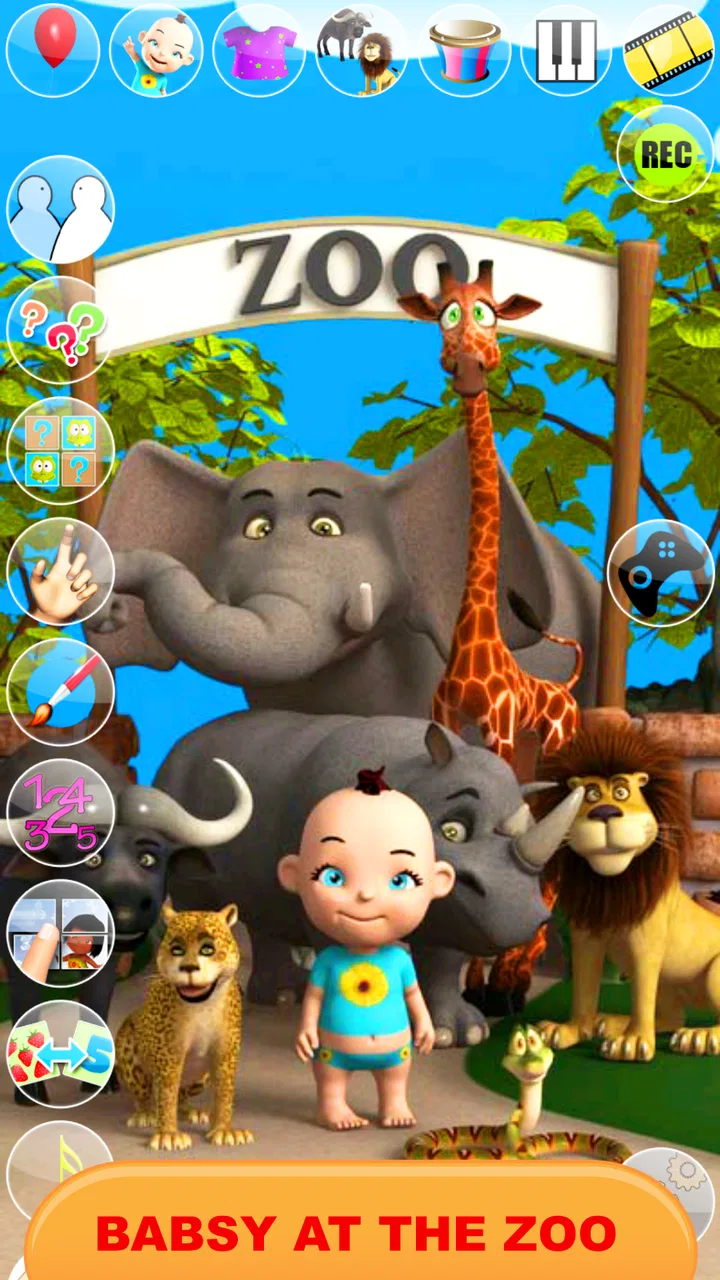
Talking Babsy Baby at the Zoo
- 4.4
- Rating
- 500.00K
- Installs
- Free
- Price

 Analysis by App-foxy
Talking Babsy Baby at the Zoo is a lighthearted comics app built around a virtual baby character and a collection of simple activities. I spent time with it expecting something closer to a playful digital toy than a traditional comic reader, and that is still the best way to understand it. The appeal comes from interacting with Babsy, watching the character react, and moving between the available mini-games rather than following a long story or reading panels.
The app is made by Kaufcom Games Apps Widgets and is free to install. It is aimed at Everyone, which makes its tone easy to share with younger children, although I would still treat it as a supervised entertainment app rather than something to hand over without checking how a child uses it. The store summary presents a virtual friend with more than thirty games, so the central promise is variety and casual interaction, not depth or a structured learning program.
What I like immediately is that it has a clear, low-pressure purpose. You open it for a few minutes, choose something to do, and leave when the novelty wears off. That makes it a better fit for a short break than for someone searching for a substantial comic series, a competitive game, or an educational tool with measurable progress.
You May Also Like

 Blood Strike: 2.5 Anniversary
Blood Strike’s Loadouts Turn Every Drop Into a Tactical Gamble
A close look at Blood Strike’s custom loadouts: how fast access to signature weapons reshapes its battle royale rhythm, rewards preparation, and narrows the gap between fights.

 Pandora - Music & Podcasts
Pandora’s Music Is Easy to Start, but Harder to Recover
Pandora’s strength is its low-effort path from a seed to a station. Its weak spot is how much confidence it asks you to place in connection, setup, and quiet recovery.

 8 Ball Pool
 Is Built on Rivalries, Rematches, and Routine
A close look at the rivalries, rematches, shared routines, and unanswered safety questions that turn a quick pool match into a persistent mobile community.

 Samsung Music
’s Quiet Strength Is Playing What You Already Own
Its reach comes less from spectacle than from dependable access to a personal library. That simplicity is both the app’s strongest retention engine and its ceiling.

 AccuWeather: Weather Radar
AccuWeather Review: A Quick, Clear Forecast for Everyday Decisions
For everyday plans, the best forecast is the one you can understand quickly. AccuWeather makes rain timing, radar, and local conditions easy to act on, with a few trade-offs.

 Hill Climb Racing
Why Hill Climb Racing Still Turns Crashes Into One More Run
A tiny car, a bumpy hill and one more upgrade: Hill Climb Racing keeps resurfacing because its simple chaos makes every near-miss feel personal.
More From Our News Desk



How the virtual zoo experience works in everyday use
I find the easiest way to judge Babsy’s zoo setting is to treat each visit as a small, self-contained play session, not as a story that needs to be followed from beginning to end. That makes it simple to fit into a wait or a quiet break, while giving me a chance to notice which interactions actually hold a child’s attention. The next section looks at how the app’s current version fits that casual role.
A playful character rather than a conventional comic
The “comics” label can create the wrong expectation if you imagine pages, speech bubbles, and a continuing plot. In practice, the character is the focus. Babsy gives the app its personality, while the surrounding zoo theme provides a setting for the interaction. I found the experience closer to a talking-character toy with game-like diversions than to a digital bookshelf.
That distinction matters when deciding whether to install it. A child who enjoys tapping characters, trying different activities, and seeing immediate reactions may find it entertaining. Someone who wants illustrated stories to read independently will probably get more from a dedicated comics reader. This app works best when the user wants participation rather than passive reading.
The short-session design is one of its practical strengths. I could imagine using it while waiting at a restaurant, during a quiet moment at home, or as a quick distraction before moving on to another activity. There is no need to commit to a long campaign. The trade-off is that the same simplicity can make the experience feel repetitive once the first curiosity has passed.
What the collection of games adds
The selection of more than thirty games gives the app a broader range than a single talking-character screen. That variety is useful because not every activity will suit every mood. A child can move on when one game feels uninteresting, and a parent can use the app as a small menu of diversions rather than relying on one repeated interaction.
Still, I would not confuse quantity with depth. A large collection of small activities can feel generous at first while offering only brief replay value in each individual item. The practical benefit is choice, not necessarily a deep progression system. This is an important trade-off: the app can occupy short gaps in the day, but it is unlikely to replace a richer game for a child who wants goals, advancement, or a more demanding challenge.
One useful way to approach it is to let the user sample several activities instead of staying with the first one. That makes the variety work harder. If a child settles on one favorite interaction and ignores the rest, the headline number of games becomes less meaningful, but the app can still serve as a compact collection of casual diversions.
Using it with a younger child
Although the age classification is Everyone, I would introduce it together with the child the first time. That is not because the basic concept is difficult; it is because younger users often tap rapidly, move through screens without reading, and may not understand when an optional purchase prompt appears. A short demonstration helps them learn where to tap and helps an adult see how the app behaves on the particular device.
A simple routine works well: open the app, choose one or two activities, and agree on when to stop. This keeps the experience from turning into aimless tapping and makes the app easier to fit into family screen-time habits. The character’s friendliness may encourage repeated visits, so the useful boundary comes from the adult rather than from expecting the app itself to manage the session.
I also found that the zoo theme gives parents an easy opportunity to talk with a child about what is happening on screen. Asking which animal or activity they prefer can turn a solitary distraction into a shared conversation. That is not a formal educational feature, but it is a realistic way to get more value from a simple entertainment app.
Cost, optional spending, and what “free” means here
The app itself is free, so trying it does not require an upfront payment. That is its clearest value advantage over a paid title: a family can see whether the character and activities hold a child’s attention before committing money. For a casual app that may be used only occasionally, free access also lowers the risk of downloading something that quickly becomes uninteresting.
There are in-app purchases priced between ninety-nine cents and one dollar ten per item. I would therefore describe the experience as free to start, with optional paid items rather than as an entirely cost-free product. The listed purchase range is modest, but the important point is to treat those items as a separate spending decision. A child should not be left to make that decision alone, and adults should check the purchase flow before allowing unsupervised use.
This pricing structure changes the value calculation in a sensible way. If the free portion already provides enough variety for occasional play, you may never need to spend anything. If a particular paid item becomes important to your child, the small individual price may be acceptable, but I would only buy it after seeing sustained interest. The app can be worthwhile at no cost; paid value depends on whether the specific extra content improves your household’s actual use rather than simply extending the novelty.
Performance expectations and device compatibility
The current version is 12.2.3 and requires Android 6.0 or later. That makes checking the operating system a necessary step before installation, especially if the app is intended for an older phone or tablet used by a child. On a compatible device, the concept is straightforward enough that the learning curve should be small, but an older device may still affect how comfortable the experience feels.
I would also leave some free storage and close unnecessary apps before giving it to a child on a less powerful device. That is a practical habit for any character-based game collection, where transitions and touch response matter more than they do in a static comic reader. If the device already struggles with other interactive apps, a lightweight reading app may be a smoother alternative.
The app has an average rating of 4.4 from around four and a half thousand ratings, and it has passed half a million installs. Those figures suggest that the basic idea has found a sizeable audience, but they should not be treated as a guarantee that every child will enjoy it. A talking baby and a zoo setting have a particular style; children who prefer puzzles, stories, or action may respond very differently.
Where it fits among the usual alternatives
Compared with a standard comics app, this title offers more direct interaction and less reading. That is useful for a child who is not yet interested in following a long narrative, but it is a poor substitute for a reader who wants a library, page controls, bookmarks, or detailed artwork. The app’s strength is immediacy, not literary content.
Compared with a dedicated virtual-pet app, it appears more focused on short games and character play than on building a long-running care routine. That can be a benefit for parents who do not want another app demanding daily attention. The downside is that users looking for a persistent companion with a strong sense of progression may find the experience less involving.
Compared with a polished standalone children’s game, the broad collection is appealing, but individual activities may feel simpler. A focused game can usually offer more carefully developed rules, clearer goals, and stronger replay motivation. I would choose Babsy when variety and quick access matter more than challenge. I would choose a dedicated title when the child has already outgrown basic tap-and-play entertainment.
Three practical ways to get more from it
First, use the app as a rotation tool rather than a single-game commitment. Let the child try several activities during the first session, then notice which ones produce genuine interest. This avoids judging the entire app by one game that does not click and also prevents the collection from becoming a blur of random taps.
Second, make the first session an adult-guided setup session. Show the child how to return to the activity selection, identify anything that costs extra, and stop the session cleanly. This small amount of guidance is more valuable here than simply installing the app and assuming the Everyone rating answers every practical question.
Third, use it as a transition activity with a defined endpoint. For example, it can fill the few minutes before leaving the house or while waiting for food, but it should not automatically become an open-ended background distraction. The short-game format makes this easy: choose one activity, finish it, and put the device away. That approach preserves the app’s strongest quality without expecting it to provide hours of meaningful engagement.
Limitations I noticed before recommending it
The biggest limitation is likely longevity. The app gives you many things to try, but the individual interactions are designed for casual amusement. Children who need increasing difficulty, unlockable goals, or a story that develops over time may lose interest sooner than they would with a more focused game.
The second limitation is the mismatch between its category label and its actual appeal. Calling it a comics app may attract readers who want comic content, yet the virtual-character format is the more useful mental model. I would explain that clearly before recommending it to a child who specifically asked for comics.
The third is the need for sensible purchase supervision. The free entry point is convenient, but optional items mean that “free” should not be interpreted as “nothing can ever cost money.” This is easy to manage when an adult sets expectations in advance, but it is a friction point for shared devices used without supervision.
There is also a question of audience fit. The Everyone rating makes the app broadly accessible, but broad accessibility is not the same as universal appeal. A preschool-age child may enjoy the character immediately, while an older child may find the presentation too simple unless they particularly like talking characters or quick mini-games.
Who should install it, and who should skip it
I would recommend trying it if you want a free, friendly activity for short breaks and the intended user enjoys virtual characters. It is especially suitable for families that prefer sampling an app before spending money, since the initial download does not require a purchase. The range of small games also makes it more flexible than a single-screen talking toy.
I would be more cautious if your priority is reading practice, structured learning, or a game with long-term progression. Those needs call for a different category of app. I would also skip it if you dislike supervising optional purchases or if the available device is below Android 6.0, since the basic installation requirement alone rules out older systems.
For an adult choosing an app for a child, the best question is not whether it has enough activities on paper. Ask whether the child likes this kind of character interaction and whether short, uncomplicated play is useful in your routine. If the answer is yes, the free access makes experimenting reasonable. If the child already demands deeper challenges, the same variety may not compensate for the lack of a more substantial core experience.
My recommendation after using it
I see Talking Babsy Baby at the Zoo as a pleasant casual download, not a complete entertainment solution. Its free starting point, virtual friend concept, and broad set of mini-games give it an approachable role in a family app collection. The developer, Kaufcom Games Apps Widgets, has positioned it for quick interaction, and the sizeable install base shows that the format has broad appeal.
My recommendation is to try the free experience first and judge it by actual repeated use, not by the number of activities alone. If the child keeps returning to the character and you can manage the optional purchases responsibly, it offers fair value without an upfront cost. If the free activities feel repetitive after a few sessions, paying for extras is unlikely to solve the deeper mismatch.
My final verdict: install it for light, supervised play, but skip it when you want a real comic reader, a serious educational app, or a deep game. The app succeeds when treated as a cheerful pocket toy for short moments. It becomes a weaker choice when asked to provide lasting progression, substantial reading, or more challenge than its simple design is meant to deliver.
FAQs for Talking Babsy Baby at the Zoo
01What is Talking Babsy Baby at the Zoo?
Talking Babsy Baby at the Zoo is an interactive app designed for children. It offers a fun, engaging experience where users can interact with a virtual baby and various zoo animals. The app includes features like repeat-after-me voice functionality, mini-games, and educational content to enhance learning and entertainment.
02Is Talking Babsy Baby at the Zoo suitable for all ages?
The app is primarily designed for young children, making it ideal for toddlers and preschoolers. It includes simple controls, playful graphics, and age-appropriate content. Parents can feel confident letting their children explore the app, as it promotes learning through fun interactions with Babsy Baby and zoo animals.
03Does Talking Babsy Baby at the Zoo include in-app purchases?
Yes, Talking Babsy Baby at the Zoo offers in-app purchases. These purchases typically unlock additional features, characters, or mini-games. While the core experience is free, parents should monitor purchases to prevent unintended spending. It's advisable to check the app settings for parental controls to manage purchases effectively.
04How does Talking Babsy Baby at the Zoo promote educational value?
The app promotes educational value by introducing children to various zoo animals and their sounds. It encourages language development through its repeat-after-me feature, where Babsy Baby mimics words and phrases. Additionally, it includes mini-games that help develop cognitive skills, such as memory and problem-solving.
05Are there any advertisements in Talking Babsy Baby at the Zoo?
Talking Babsy Baby at the Zoo may contain advertisements, particularly in its free version. These ads are typically child-friendly but can be intrusive. Parents can opt for an ad-free experience through in-app purchases or by downloading the premium version, ensuring uninterrupted playtime for their children.
Pros
- Cute and engaging animations.
- Easy to navigate interface.
- Variety of animal sounds.
- Interactive learning features.
- Free to download and play.
Cons
- Contains in-app ads.
- Limited content without purchases.
- Requires internet for some features.
- May be too simple for older kids.
- Occasional app crashes reported.

Talking Babsy Baby at the Zoo
Gallery